
Akron Car Search
Car Rental at 'Akron - Airport'
Rental system 'OrangeSmile.com-CarTrawler' offers a unique opportunity to hire a vehicle of your choice in Akron for any desired rental period at lowest rates. All our featured car options in USA come as an 'All Inclusive' package, and there are no service charges or fees associated. All the rental phases, documents and the customer support are provided in English.
Frequently asked questions on the rental process.
Available offices:
Car and options choice. The search results indicate valid and final rental rates at the 'Akron - Airport' location. The rates are formed on the 'All included' principle. Presented prices do not include additional options, such as a GPS navigator, child seats, winter tires, etc. They can be added later on, during the last phase of the booking process.
Hiring conditions are different for each rental car in USA. Therefore, before making a reservation, make sure you haveve read the conditions. The reservation is performed in three quick steps: searching for a car by location and rental dates, selecting desired vehicle and filling in the booking form. Upon reservation approval, you will receive a rental voucher via email.
Car pick-up. Upon arrival to the location 'Akron - Airport', provide the required documents specified in your voucher to the rental officer. Directly in the office, inspect the rental invoice carefully – should match with your voucher. Besides this, do not forget examine the car exterior carefully – all defects discovered at the pick-up time should be included in your rental document.
Car return. Make sure to return the vehicle within the specified timeframe and to adhere to the fuel conditions (return full or return empty).
OrangeSmile.com wishes you a pleasant and trouble-free driving in USA!
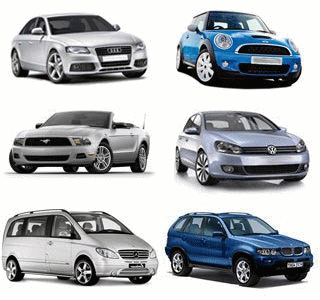
 Mini & economy hatchback:
Ford Fiesta, Kia Picanto and Hyundai Atos
Mini & economy hatchback:
Ford Fiesta, Kia Picanto and Hyundai Atos
 Compact & intermediate sedan:
Chevrolet Cobalt, Toyota Corolla and Toyota Auris
Compact & intermediate sedan:
Chevrolet Cobalt, Toyota Corolla and Toyota Auris
 Full-size saloon & station wagon:
Toyota Camry, Nissan Maxima and Toyota Camry
Full-size saloon & station wagon:
Toyota Camry, Nissan Maxima and Toyota Camry
 Premium & luxury limousine:
Dodge Magnum, Ford Grand Marquis and Buick Lucerne CXL
Premium & luxury limousine:
Dodge Magnum, Ford Grand Marquis and Buick Lucerne CXL
 Minivan & minibus, 7-15 pax:
Dodge Caravan, Chrysler Voyager and Chevrolet Uplander
Minivan & minibus, 7-15 pax:
Dodge Caravan, Chrysler Voyager and Chevrolet Uplander
 SUV, crossover & off-road vehicle:
Toyota Landcruiser, Nissan Pathfinder 4WD and Jeep Wrangler
SUV, crossover & off-road vehicle:
Toyota Landcruiser, Nissan Pathfinder 4WD and Jeep Wrangler
 Cabriolet, roadster & convertible:
Ford Mustang Convertible, Chrysler Sebring Convertible and Jeep Wrangler
Cabriolet, roadster & convertible:
Ford Mustang Convertible, Chrysler Sebring Convertible and Jeep Wrangler
 BEST PRICE GUARANTEE
100.000+ SATISFIED CLIENTS
WIDE CHOICE: 25.000 HIRE POINTS
BOOKING IN 3 SIMPLE STEPS
INSTANT CONFIRMATION
BEST PRICE GUARANTEE
100.000+ SATISFIED CLIENTS
WIDE CHOICE: 25.000 HIRE POINTS
BOOKING IN 3 SIMPLE STEPS
INSTANT CONFIRMATION

AVIS

ALAMO

BUDGET
DOLLAR

RENT-A-CAR

EUROPCAR

NATIONAL

PAYLESS

SIXT

THRIFTY
Payment
Changing your booking
Cancelling your booking
Confirmation voucher
Crossing borders
Fuel conditions
Age restrictions
Extra services
Insurance types
Driving license
What does the price include

orangesmile.com


 If your voucher indicates that you will be met at a certain place, go to that specified location and wait for the employee. Please use the office phone number indicated in the voucher and let them know that you have already arrived.
If you see that the rental desk in Akron refuses to provide the services indicated in your voucher, please call us via the customer support number indicated in your voucher.
If your voucher indicates that you will be met at a certain place, go to that specified location and wait for the employee. Please use the office phone number indicated in the voucher and let them know that you have already arrived.
If you see that the rental desk in Akron refuses to provide the services indicated in your voucher, please call us via the customer support number indicated in your voucher.

» Baltimore: 2 locations
» Boston: 4 locations
» New York: 10 locations
» Cambridge: 1 location
» Dallas: 5 locations
» Las Vegas: 20 locations
» Indianapolis: 6 locations
» Los Angeles: 6 locations
» Miami: 7 locations
» Minneapolis: 2 locations
» Anaheim: 2 locations
» Manhattan: 11 locations
» Hawaii Honolulu: 5 locations
» Memphis: 2 locations
» Maui: 2 locations